
Service Pages vs Location Pages: What's the Difference?
How service pages and location pages differ, and how to structure both without creating duplicates.
These two page types get muddled constantly, which is how businesses end up with forty near-identical pages that do nothing. They answer different questions and should be written differently.
| Service page | Location page | |
|---|---|---|
| Answers | What is this job and what does it cost? | Do you work here, and are you any good in my area? |
| Example | Switchboard upgrades | Electrician in Chermside |
| Main content | Process, pricing, materials, timeframes | Area context, jobs done nearby, coverage, response times |
| Built first? | Yes | After services are done |
| Risk | Being too shallow | Being duplicated across suburbs |
What goes on a service page
- What the job involves, start to finish.
- Signs someone needs it.
- Pricing information, or what drives the price.
- Timeframes and lead times.
- Materials, brands or methods.
- Photos of that specific work and a relevant review.
What goes on a location page
- Confirmation that you genuinely work there, and your response time.
- Something real about the area - housing stock, common issues, access.
- Jobs you've done nearby, ideally with photos.
- Reviews from customers in or near that area.
- Neighbouring suburbs you also cover.
- Links to the relevant service pages.
That last point matters: location pages should send people to service pages for the detail, not repeat it.
The combined page: service + location
"Blocked drains in Coorparoo" is both at once, and it's often the highest-intent search there is. These work well - but only where you genuinely do that work in that area, and only if the page has something specific to say. A handful of well-written combined pages beats a hundred generated ones.
How to structure it
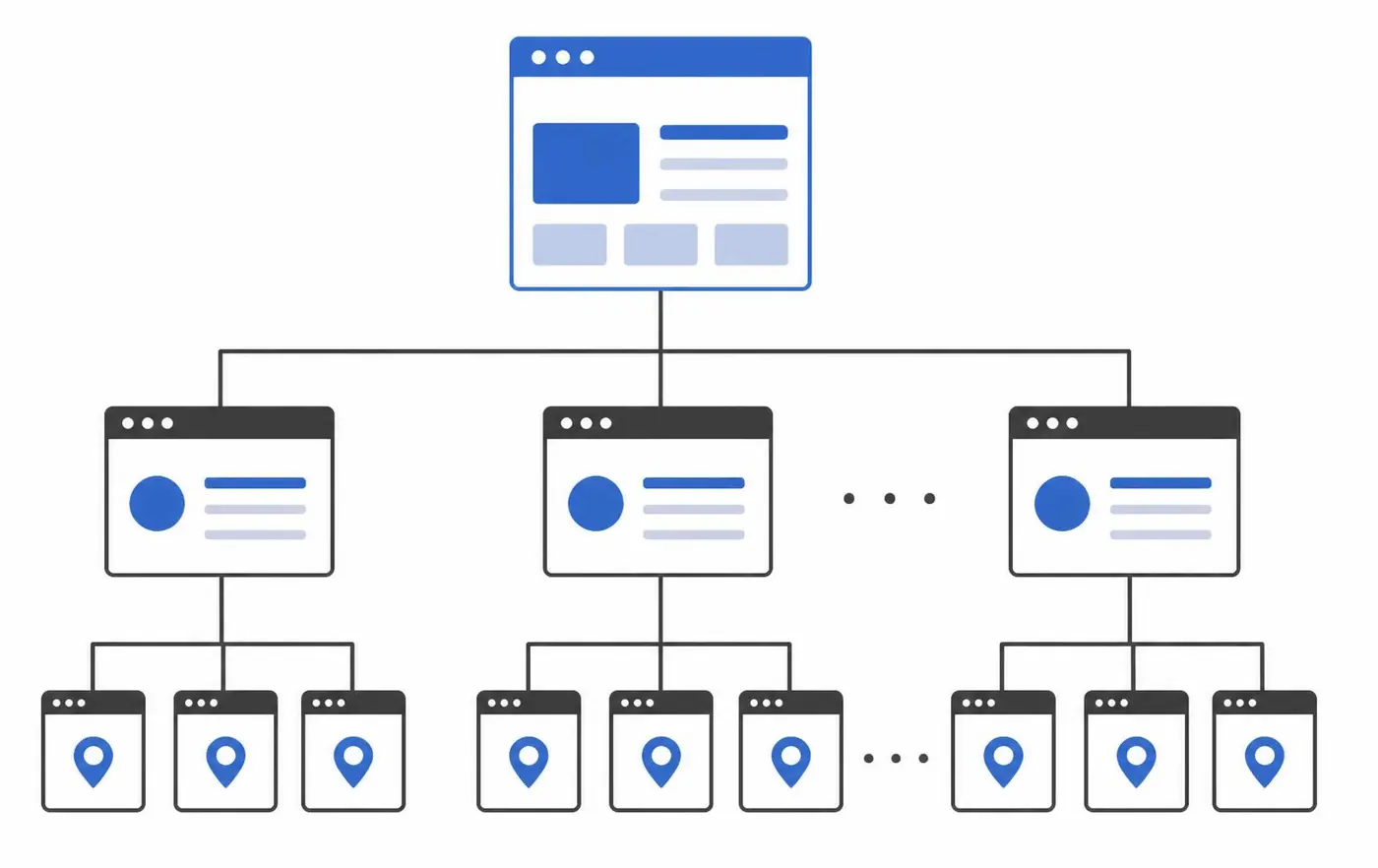
- Home page - what you do, who for, where.
- Services overview → a page for each service.
- Service areas overview → a page for each area you genuinely cover.
- Combined service + location pages for your most valuable jobs in your busiest suburbs.
- Cross-link: services to areas, areas to services, neighbouring areas to each other.
The mistake that ruins both
Copying one page and swapping the suburb name. It's obvious to readers, it's obvious to search engines, and it makes the entire site look thin. If you can't write something real about an area, list it on a coverage page instead of giving it a page of its own.
More on that in do location pages actually help SEO, and should every service have its own page.
This is exactly how the sites I build are structured. Tradie website design covers the service side and local SEO services covers the location side.
Want to Improve Your Google Visibility?
SEO varies enormously depending on your website, your market and who you're competing against, so there's no fixed package. Tell me what you do and where you work, and I'll tell you honestly what's realistic.
Talk to Mike About SEOCommon questions
- Which should I build first?
- Service pages, always. They answer the question people are actually asking, and location pages have nothing to link to without them.
- How many location pages should I have?
- As many areas as you genuinely work in and can write honestly about. For most sole traders that's a handful; for a larger business with crews it can be many more.

Written by Mike - Web Guy Mike
I build and look after websites for Australian tradies and small service businesses. Every site is built by me - no outsourcing, no account managers. More about Mike.